


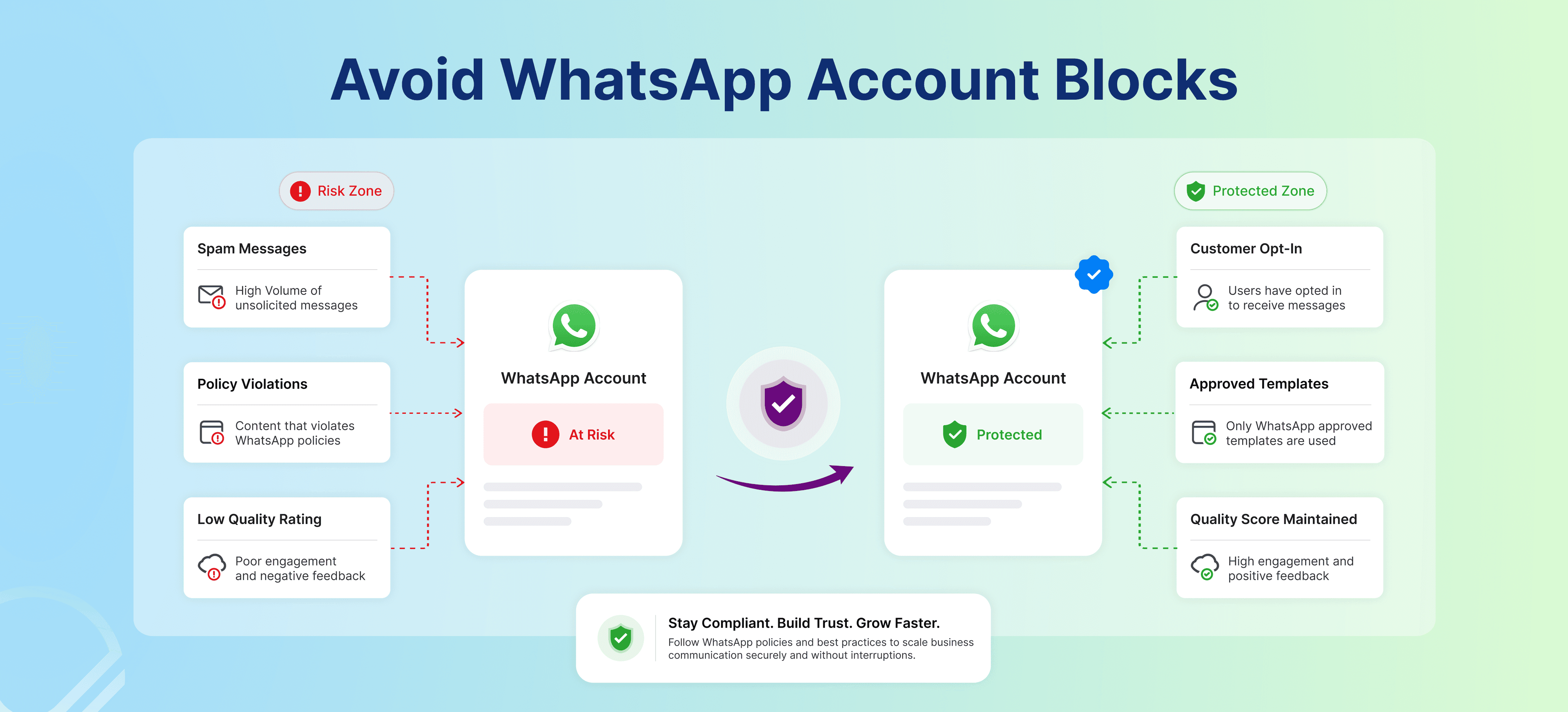
Introduction
WhatsApp has become a preferred communication channel for businesses, enabling customer support, appointment reminders, order updates, and marketing campaigns through a single platform. As adoption grows, Meta continues to strengthen its messaging policies and spam detection systems to protect user experience.Businesses that ignore these guidelines may face messaging restrictions, lower quality ratings, or even a WhatsApp Business account blocked status.If you're wondering why WhatsApp blocks business accounts or how to avoid a WhatsApp Business account suspension, understanding the platform's compliance requirements is essential. This guide covers the most common reasons accounts get blocked and the best practices for using the WhatsApp Business API and WhatsApp automation safely.
Top Reasons WhatsApp Blocks Business Accounts
1. Sending Messages Without Customer Consent
One of the biggest reasons a WhatsApp Business account gets blocked is messaging users without their permission.Customers who receive unsolicited promotional or automated messages are more likely to block or report the sender, triggering WhatsApp spam detection systems.To stay compliant, always collect opt-ins through the following:
- Website forms
- Click-to-WhatsApp ads
- Appointment bookings
Clear customer consent not only reduces the risk of account suspension but also improves engagement and builds trust.
2. Excessive Bulk Messaging
Sending a large number of messages in a short period can make your business appear spammy, especially when targeting cold audiences.Common mistakes include:
- Broadcasting repetitive promotional messages
- Using new numbers for mass campaigns
- Sending generic templates to every customer
Instead, focus on audience segmentation, personalized communication, and relevant updates. Well-targeted campaigns generate better engagement while significantly reducing the chances of a WhatsApp Business account suspension.
3. Using Unofficial or Unauthorized Tools
Using unofficial APIs, browser extensions, scraping software, or modified WhatsApp applications is one of the fastest ways to get a WhatsApp Business account blocked.Businesses should always rely on the official WhatsApp Business API or Meta-approved WhatsApp automation platforms to ensure secure, scalable, and policy-compliant communication.
4. Poor Message Quality Ratings
WhatsApp assigns every business a quality rating based on customer interactions.Frequent spam reports, blocked numbers, or ignored messages can reduce messaging limits and eventually lead to account suspension.To maintain a healthy account:
- Personalize conversations
- Share useful updates
- Avoid excessive promotions
- Respond to customer queries promptly
Providing value in every interaction helps improve engagement while avoiding WhatsApp spam detection
5. Violating WhatsApp Commerce Policies
Promoting restricted products or services can also result in account restrictions.Common policy violations include promoting:
- Gambling services
- Unauthorized medicines
- Adult content
- Counterfeit products
Before launching any campaign, review WhatsApp's Commerce Policy and ensure every message complies with Meta's guidelines.Following these policies protects your account, maintains customer trust, and supports sustainable business growth.
6. Excessive Promotional Messaging
Promotional campaigns are effective only when they provide value. Sending frequent sales messages or repetitive offers can frustrate customers and increase the chances of them blocking or reporting your business.Instead of constant promotions, maintain a balanced messaging strategy that includes:
- Appointment reminders
- Order and payment updates
- Customer support responses
- Personalized recommendations
- Occasional promotional offers
Businesses that focus on relevant communication rather than message volume are less likely to face a WhatsApp Business account suspension and are more likely to build long-term customer relationships.If you're planning large-scale promotional campaigns, it's equally important to understand the right messaging frequency, audience segmentation, and compliance best practices. Read our guide on How to Run WhatsApp Campaigns Without Getting Blocked in 2026 to learn how to scale campaigns safely while maintaining a healthy account reputation.
7. Low Engagement Rates
WhatsApp evaluates how customers interact with your messages. If users consistently ignore, delete, or leave conversations without responding, your account quality may decline.To improve engagement:
- Personalize conversations
- Use AI-powered chatbots for instant support
- Offer quick replies and interactive workflows
- Share updates that are useful to customers
Using WhatsApp automation to create meaningful conversations instead of generic broadcasts helps maintain a healthy account reputation.
8. Rapid Scaling Without Warm-Up
Launching a new WhatsApp number and immediately sending thousands of messages can trigger WhatsApp spam detection systems.A safer approach is to:
- Start with a small number of conversations
- Engage existing customers first
- Gradually increase messaging volume
Building a natural messaging history significantly reduces the risk of your WhatsApp Business account being blocked.
9. Ignoring Customer Support Expectations
WhatsApp is designed for two-way communication, not just marketing.
Businesses that fail to respond to customer queries often experience lower engagement and higher complaint rates.To deliver a better customer experience:
- Respond quickly to customer messages
- Use reliable AI chatbots
- Enable smooth handoffs between AI and human agents
Combining the WhatsApp Business API with intelligent automation helps businesses provide faster, more personalized support while maintaining customer trust.
10. Sharing Misleading or Clickbait Content
Misleading claims, fake urgency, and suspicious links can quickly damage customer trust and trigger spam reports.Avoid messages that exaggerate offers or create unnecessary urgency. Instead, focus on:
- Transparent communication
- Honest product information
- Clear call-to-actions
- Authentic offers
Trustworthy messaging not only improves engagement but also helps businesses avoid WhatsApp spam detection and account restrictions.
What to Do If Your WhatsApp Business Account Gets Blocked
If your WhatsApp Business account is blocked, review your recent messaging activity before taking action.Start by checking whether you:
- Sent promotional messages without customer consent
- Used unofficial automation tools
- Violated WhatsApp messaging or commerce policies
Next, review your account quality if you're using the WhatsApp Business API. A declining quality rating often indicates high block rates, spam reports, or poor engagement.Stop using unauthorized tools, switch to a Meta-approved WhatsApp automation solution, and submit an appeal through the official WhatsApp or Meta support channels.Once your account is restored, focus on collecting proper customer opt-ins, personalizing conversations, and sending valuable updates instead of excessive promotional messages to reduce the risk of future suspensions.
Warning Signs Your WhatsApp Business Account Is at Risk
Businesses often don't realise their account is at risk until messaging limits are reduced or restrictions are applied. Monitoring the following warning signs can help identify potential issues before they lead to account suspension.
| Warning Sign | What It Could Indicate |
|---|---|
| Declining Quality Rating | Customers are reporting, blocking, or ignoring messages |
| Reduced Messaging Limits | WhatsApp has detected negative engagement signals |
| Lower Message Delivery Rates | Account reputation may be deteriorating |
| Increased Customer Blocks | Messaging frequency or content may be perceived as spam |
| Template Message Rejections | Potential policy or compliance issues |
| Policy Violation Notifications | WhatsApp has flagged account activity for review |
Regularly monitoring these indicators and following WhatsApp Business API best practices can help businesses avoid restrictions and maintain uninterrupted customer communication.
How Businesses Can Avoid WhatsApp Account Blocks
Preventing a WhatsApp Business account blocked status is much easier than recovering from one. Businesses that follow Meta's messaging policies and prioritize customer experience are far more likely to maintain a healthy account.Follow these best practices:
Use the Official WhatsApp Business API
Always use the WhatsApp Business API or Meta-approved solutions for business communication and automation. Official platforms provide secure, scalable, and policy-compliant messaging while reducing the risk of account restrictions.
Collect Customer Opt-Ins
Only message customers who have explicitly agreed to receive communication. You can collect opt-ins through website forms, appointment bookings, click-to-WhatsApp ads, or newsletter subscriptions.
Personalize Every Conversation
Avoid sending identical messages to every customer. Segment your audience and send relevant updates based on their interests or previous interactions. Personalized communication improves engagement and reduces the likelihood of WhatsApp spam detection.
Maintain a Balanced Messaging Frequency
Instead of sending frequent promotional campaigns, create a healthy mix of:
- Transactional updates
- Customer support messages
- Educational content
- Product recommendations
- Promotional offers
Providing value in every interaction helps build trust and maintain a strong account reputation.
Monitor Account Quality
Regularly review your quality rating, messaging limits, and template approvals. If you notice declining engagement or increased customer blocks, adjust your messaging strategy before restrictions become more severe.
Use WhatsApp Automation Responsibly
AI-powered WhatsApp automation can improve customer support, appointment scheduling, and order updates when implemented correctly. The goal should be to simplify customer communication—not overwhelm users with excessive messages.
Conclusion
WhatsApp remains one of the most effective platforms for customer engagement, support, and business communication. However, businesses that ignore Meta's messaging guidelines risk reduced messaging limits, poor account quality, or even a WhatsApp Business account suspension.Understanding why WhatsApp blocks business accounts and following best practices can help businesses communicate confidently while maintaining compliance.To protect your account:
- Use the official WhatsApp Business API
- Collect customer consent before messaging
- Personalize conversations
- Monitor account quality regularly
- Use compliant WhatsApp automation solutions
Businesses that focus on trust, transparency, and meaningful customer interactions are more likely to achieve sustainable growth while avoiding unnecessary account restrictions.
FAQ
Q1. Why does WhatsApp block business accounts?
WhatsApp blocks business accounts when it detects spam-like behavior, policy violations, unauthorized automation tools, or excessive promotional messaging that negatively impacts user experience.
Q2. What should I do if my WhatsApp Business account is blocked?
Review your recent messaging activity, stop using unauthorized tools, identify any policy violations, and submit an appeal through the official WhatsApp or Meta support channels.
Q3. How can I avoid a WhatsApp Business account suspension?
Use the official WhatsApp Business API, collect customer opt-ins, personalize communication, monitor account quality, and avoid sending excessive promotional messages.
Q4. Is bulk messaging allowed on WhatsApp?
Yes. Businesses can send bulk messages through approved solutions as long as customers have opted in and the communication follows Meta's Business Messaging and Commerce Policies.
Q5. Does WhatsApp automation increase the risk of account bans?
No. Using compliant WhatsApp automation platforms and the official WhatsApp Business API is safe. The risk arises when businesses use unofficial tools or send irrelevant, spam-like messages.


